
Trading
Every trade on Qian goes through the QianSwapRouter. It handles wrapping, pool routing, and the V3/V4 differences for you, on whichever chain the token lives.
Buying and selling
Every token page has the trade widget in the top right:
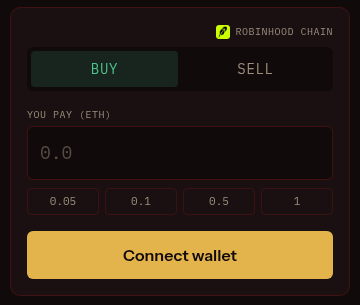
- Buy: enter an ETH amount (or tap a preset), confirm. Tokens land in your wallet. One click, no approval needed.
- Sell: switch to the Sell tab and enter a token amount (or use the 25/50/75/100% chips). The first sell of a token needs a one-time approval, then it's one click too.
If your wallet is on the wrong network, the site switches it for you before the trade.
The quote breakdown shows everything before you sign: expected output, price impact, fees, and the minimum you'll receive after your slippage tolerance (default 1%). If a trade would revert (too little ETH, slippage too tight), the button tells you why instead of letting you burn gas.
Fees
Each token's pool charges its own creator fee: the fixed standard rate on a V3 token, or whatever the creator chose on a V4 one. The quote breakdown itemizes everything before you sign, so the total is never a surprise.
Non-Qian tokens too
The router is open to any token, on any chain Qian supports, as long as it has a Uniswap ETH pool (the router picks the deepest one). If a token has no ETH pool at all, the widget disables with "no WETH pool for this token".
Prices in USD
Prices, market caps and volumes across the site show in USD, derived from the live ETH price. Charts are TradingView with market-cap scaling: you see the token's market cap, not a raw ETH price with too many zeros.